Win32
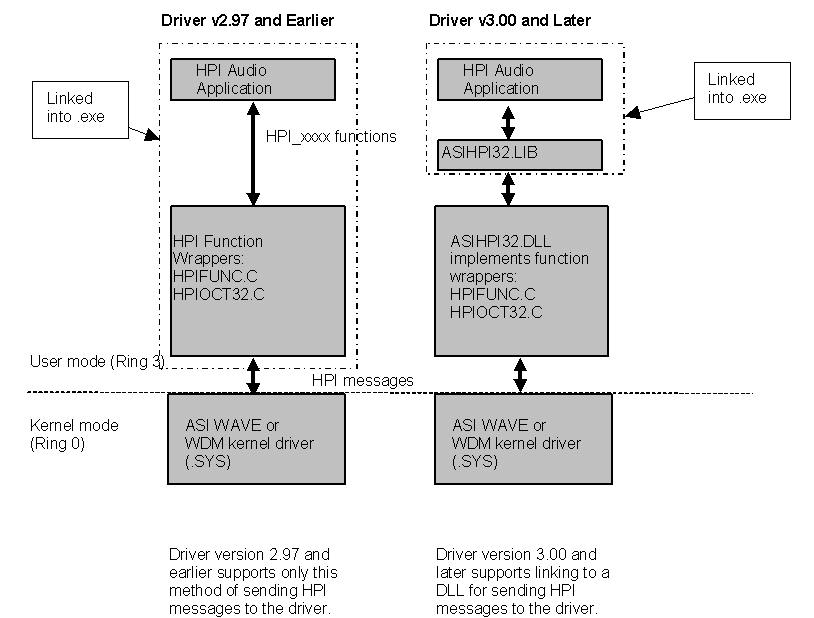
The HPI can be run as a Win32 program under Windows NT/2000/XP/Vista/Windows7. The HPI runs as a kernel mode driver and links to the Win32 audio application via an IOCTL interface. Under Win2000/XP/Vista/Windows7 the driver is a kernel driver called asihpiwn.sys
Prior to driver 3.00, customers writing HPI level applications for Windows would link HPIFUNC.C into their application. This has the drawback of limiting some internal HPI structures to 32-bit only. The more transparent approach is to have AudioScience provide a DLL that implements the functions in HPIFUNC.C so as to shield the customer's application from internal HPI structure sizes. We call the 32-bit version of this DLL ASIHPI32.DLL. All functions previously available in HPIFUNC.C are available via ASIHPI32.DLL.
The following compiler defines should be used for any 32-bit project that interfaces with ASIHPI32.DLL - HPIDLL_IMPORTS;HPI_OS_WIN32_USER.
See NOTE0013 for more info on the changes between 2.XX and 3.XX
Debugging
The following description applies to driver 3.06.00 and later.
In ASIDRV.INI (in your windows directory) find the [Audio Science Driver Information] section and set Internal Error Logging to 'on' and Error Logging Level to 'Error' - or whatever other level you wish to use. Reboot the computer after ASIDRV.INI has been edited so that the changes will take effect.
[Audio Science Driver Information]
Internal Error Logging=on
Error Logging Level=error
Valid levels are:
| Level | HPI define | Description |
| error | HPI_DEBUG_LEVEL_ERROR | Error condition, driver/adapter probably won't work |
| warning | HPI_DEBUG_LEVEL_WARNING | Condition shouln't normally happen, but adapter keeps working |
| notice | HPI_DEBUG_LEVEL_NOTICE | Normal but significant condition |
| info | HPI_DEBUG_LEVEL_INFO | Informational eg success of driver loading, which cards detected |
| debug | HPI_DEBUG_LEVEL_DEBUG | Debug: tracing normal operation. This will allow you to see all HPI messages. |
| verbose | HPI_DEBUG_LEVEL_VERBOSE | Verbose debug = extreme detail, huge log files |
Run WinDbg?.exe or DebugView?.exe (both available on Microsoft's website) to view the messages. Get DebugView? here: http://www.microsoft.com/technet/sysinternals/utilities/debugview.mspx
Linux
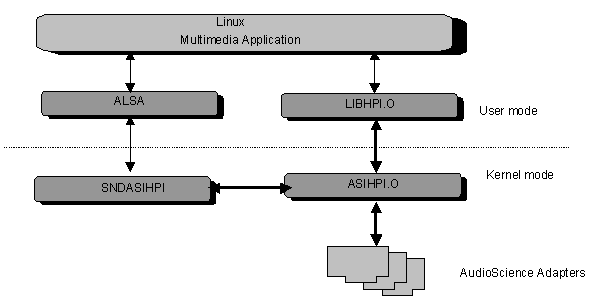
The HPI can be run under Linux with kernels of version 2.2 or greater. The HPI takes the form of a loadable kernel module called ASIHPI.O. The user app links to LIBHPI.O